Player Support
My install goal isn't checked off. Will I still be rewarded if I try to complete the offer?
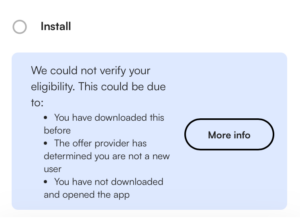
No. The install goal (or eligibility goal) must be checked off to be eligible for rewards.
The install goal checks off automatically for all new users. All you have do is download the app from the offer and open it. Within 10 minutes maximum, this goal should check off automatically. As long as our partner considers you to be a new user, this should happen shortly after opening the app.
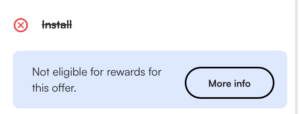
Both of the messages you might see below indicate that you are not eligible. If you are seeing either of these messages, do not attempt to complete the offer. You are not considered a new user and are not eligible for rewards or support for that offer.
How do I request support for the install goal?
The install goal is not able to be disputed. When you download an app through an AdGem offer, that data is sent to our partners. From there, they let us know if your install was ‘attributed’ to AdGem or someone else.
There are a number of reasons why you might not be eligible for an offer, including but not limited to:
- You have already downloaded this app in the past and you are not considered a new user.
- You did not download the app through our offer link and instead downloaded it directly through the app store.
- You clicked on ads for this app or clicked on a different offer for this app somewhere else.
If the install goal has not checked off after 10 minutes, this means that you were ‘attributed’ to someone other than AdGem. You should not attempt to complete this offer, as you are not eligible for rewards or support.
Why have none of my install goals checked off?
If you have never had an install goal check off, it’s possible that you have a setting enabled that is interfering with ad-tracking, the process that allows us to communicate with platforms and apps to determine eligibility for offers.
There are many different settings and services that can interfere with ad-tracking, though these are not enabled by default on most devices. If you have enabled settings that limit ad-tracking or downloaded third party apps that enable privacy settings on your device, you should turn those off to participate in offers.
For example, iCloud Private Relay for iOS devices will block signals that allow us to determine eligiblity with our partners. Services like these prevent you from being able to participate in offers correctly and should be turned off prior to engaging in AdGem offers.
What causes an account suspension?
AdGem suspends accounts that have been marked as fraudulent or are otherwise breaking our Player Agreement.
Some common suspension reasons include:
- Completing offers in multiple countries
- Using a VPN
- Using multiple devices to complete offers
- Completing an offer in a way that is not possible or otherwise matches fraudulent patterns we have seen
- Submitting fraudulent screenshots within a support request for an AdGem offer
- Demonstrating abusive behavior towards our support team
A more comprehensive list can be found within our Player Agreement.
If my account is suspended, what happens to my rewards?
Suspended accounts are considered to have violated our Player Agreement. Players that are suspended are unable to continue interacting with AdGem Offers and all rewards earned are considered forfeited.
I can't access the service that I was using to complete AdGem Offers. Who can help?
We’re sorry to hear that!
We can help appeal AdGem related suspensions, though we may not have control over a general ban from any other services.
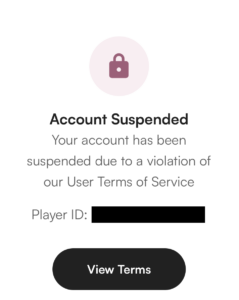
AdGem suspensions will restrict you from participating in offers and will instead show you the screen below with a player ID. If you aren’t seeing this screenshot, you should reach out to the service directly and find out who was responsible for your ban for next steps.
I want to appeal an AdGem suspension
In order to appeal an AdGem suspension, complete the form below. You will need your AdGem Player ID to proceed.
Your AdGem Player ID is located on the account suspended screen, the first thing you should see when attempting to open the AdGem Offerwall while suspended. Some partners may not display this screen. If that is the case, you will need to reach out to the service you access AdGem from and ask them for your AdGem Player ID before starting this form.
I didn't get rewarded for a goal of an AdGem offer. How do I request support?
We’re sorry to hear that you’re running into an issue with an AdGem offer.
We need to go over some common situations and make sure that none of these apply before starting a support request.
All of the following must be true to be eligible for rewards from a support request.
- The “install” goal is checked off for the offer
- The goal is fully completed
- The goal has been completed within the listed timeframe for that goal.
- If there is no timeframe for the goal itself, it must be completed within the timeframe listed in the “Basic Requirements” section.
- All timeframes begin as soon as the “install” goal checks off, unless otherwise noted.
If you submit a case and any of these aren’t true, your case will not be rewarded. If these are all true, you are eligible for rewards from a support request. Please see the next question for how to start a case.
I'm eligible for support. How do I start a support request?
Starting a support case will be slightly different based on how our partner has integrated with AdGem Offers.
The instructions below are for partners who have the full AdGem Offerwall enabled. If the screenshots attached look nothing like the interface that you are seeing, you will need to reach out to the service that you use to access AdGem Offers and ask them how you can request support. Otherwise, read below.
Find the individual offer you need to request support for:
- Open the AdGem Offerwall.
- This will be where you originally viewed and started the offer, in most cases.
- From the Offerwall, select “My Offers”. You’ll see all offers that you’ve started under the “Continue Earning” section.
- This might be named “My Games” as well.
Request support for individual goals:
- Click on the offer where a goal did not track.
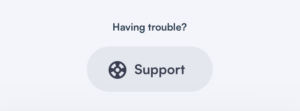
- Scroll to the very bottom of that offer. There will be a “Support” button that links to our support form.
- Complete the form, attaching your Advertising ID and your evidence to submit a case.
- Repeat these steps for any individual goals that have not tracked.
We will take a look as soon as we can. Make sure to check your email for a confirmation of case creation. We will send all updates to that email as well, so make sure to check your email regularly!
What evidence is required to reward my case?
The more clear your evidence is, the more likely your case will be rewarded without needing any additional information. Please make sure that screenshots you upload as evidence are not cropped, edited, compressed or blurry.
What we need will depend on the type of offer you’re requesting support for.
- If the goal is requiring that you complete a level, please upload evidence that clearly shows the level has been reached or completed, depending on what the goal requires.
- If the goal is requiring that you subscribe to a service, please upload evidence that shows your sign up date through a welcome email and any subscription purchases, if applicable.
- If the goal requires a purchase, please upload a receipt of purchase from the app store, including the date and name of the purchase.
What is my Device ID and where can I find it?
Your Device ID is a unique identifier attached to your mobile device that helps us verify if an offer is completed.
- If you use an iOS device, your device ID Is called IDFA
- If you use an Android device, your device ID is called AdID
Finding your device ID is simple. There is a different process depending on your device. Once you have your device ID once, this should not change unless you change devices.
I am using an iOS (Apple) device
The device ID is hidden by default. You can download any of the below apps to find your IDFA.
Please note that your ID may only consist of one number! This is still valid.
I am using an Android device
- Open the Google Settings App – depending on your phone, either:
- Open your phone’s Settings app and then Google
- Open a separate app called Google Settings
- Tap on Ads
- Your Advertising Identifier will be listed at the bottom of the screen
When I try to request support, I'm getting an error message
There are a few common error messages that may appear and prevent you from requesting support.
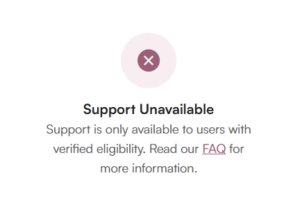
- Unverified eligibility:
- If you are seeing this message, this means that you did not successfully check off the “install” goal for this offer and are not eligible for rewards. See the offer eligibility section for more information.

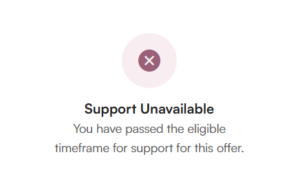
- Passed eligible timeframe:
- If you are seeing this message, this means that you are well past the timeframe to earn for this offer listed in the “Basic Requirements” section. All offers have timeframes and attempting to complete goals after this timeframe has passed will not earn any rewards, including through support cases.

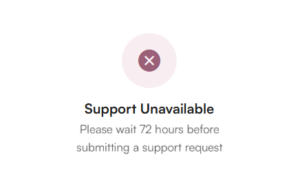
- 72 hour delay:
- If you are seeing this message, this means that 72 hours has not passed since you originally started the offer. Please wait until 3 full days have passed since you started the offer, then you will be able to submit a support case.

If you’re seeing an error message unrelated to these common errors, please reach out to us directly in the “Get Help” section so we can help diagnose the issue.
Why was my case not rewarded?
The AdGem support team always provides a reason when a case is closed. You can access this, and all correspondence for your case, by going to the chat section of your support case. To get to the chat, click on the “Support Case” button in the email you received.
Here are the most common reasons why cases are not rewarded:
- The goal was not fully completed
- For example, the goal might say to complete Level 10, so players that have just started Level 10 haven’t finished the goal yet.
- The goal was not completed within the timeframe
- Timeframes are in both the “Basic Requirements” section and sometimes the goal itself. If a goal has a stricter timeframe than the basic requirements, the goal must be completed within that timeframe!
- The goal triggered on its own after you submitted the case
- Rewards can be subject to a 24 hour delay. If a goal does end up triggering on its own, the case will be closed and the player will be notified.
My case was rewarded but my rewards are pending. Why?
When rewards are pending, this is part of a secure process to ensure that funds arrive in your account correctly. This can be common for high payout goals of offers.
We do not have the ability to speed up this process. Please be patient and rewards will arrive in your account!
I want to appeal a case decision
In order to appeal an AdGem case decision, complete the form below. You will need your case number(s), the reason your case was closed and the reason that you believe this decision was incorrect.
Please note that case appeals do not guarantee any reversal of our initial decision, though we will take another look at your case.
Having a different issue?
You can complete the attached form to reach out to our support team. Please carefully review the rest of the FAQ first to ensure your question has not already been answered elsewhere.
If you already have an open case regarding a missing reward, please wait for our support team to respond to your case. Completing this form will not result in your case being moved up in the queue.